
NEWS
WhatsApp Adds a Password After a Billion Passkeys
WhatsApp now counts more than a billion passkeys, yet it still needs a typed password because a passkey does not stop a stolen SIM.

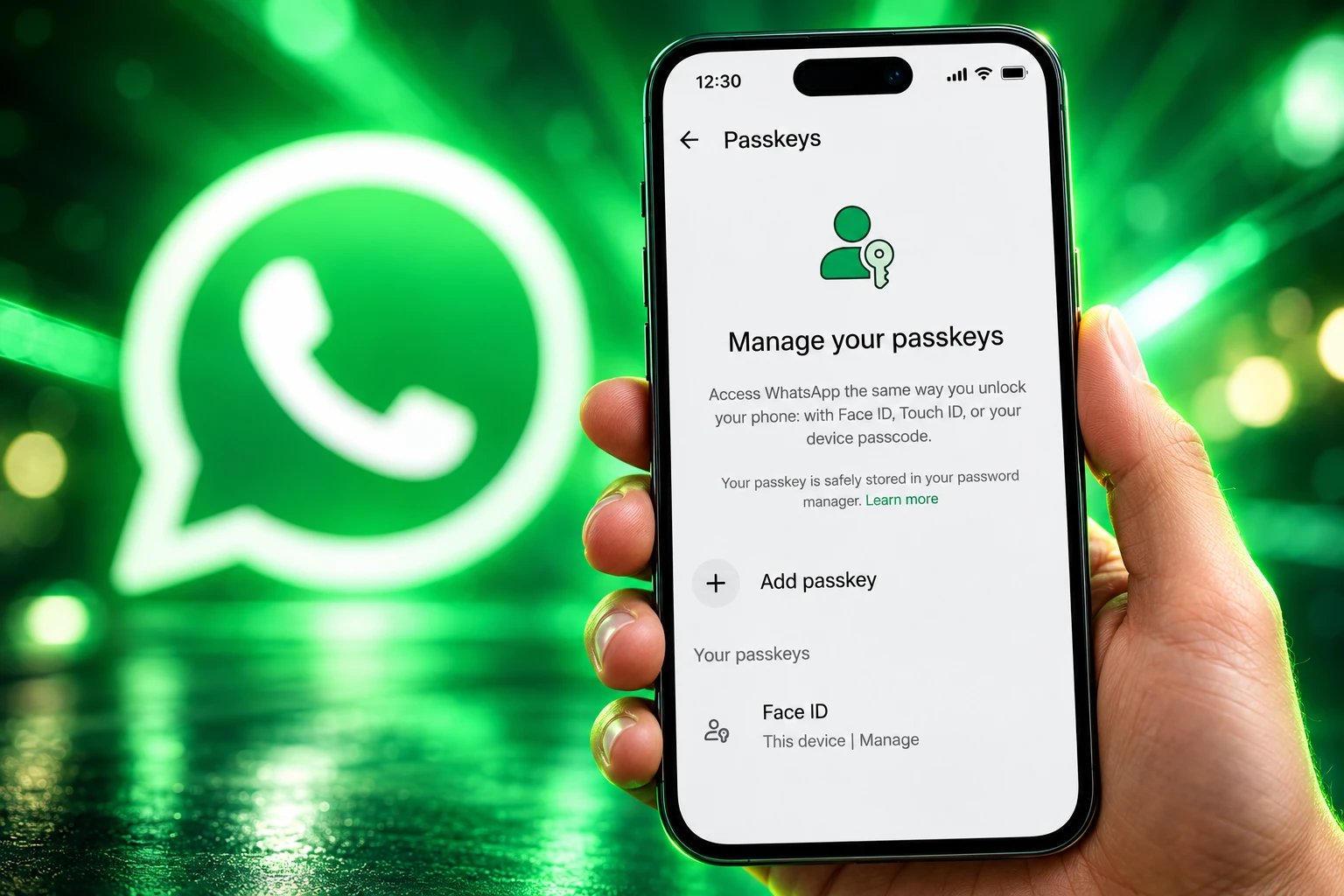
WhatsApp said on 25 August that more than a billion users have created a passkey, and it is replacing the six-digit PIN with a full password. The same post added extra context for unknown callers on Android and let one account hold more than one passkey. Those features are still arriving in waves, so some phones will not show them yet.
The passkey is the number WhatsApp wanted in the headline. The password is the fix for the lock that actually sits in front of a stolen SIM, and that lock had been six digits for years.
A Billion Passkeys Still Leave a Password in Place
A passkey lets you come back into WhatsApp with a fingerprint, a face scan, or the screen lock already on the phone, instead of typing the six-digit SMS code. WhatsApp put that count in a post about more than a billion passkeys on WhatsApp, and it is the largest figure a consumer chat app has been willing to print. The company also says it is protecting more than three billion accounts, so a billion passkeys is a big slice, not the whole base.
Passkeys on WhatsApp started on Android in October 2023 and reached iPhone the following April. In late October 2025 the same method was extended to end-to-end encrypted chat backups, which until then used a backup password or a 64-digit key. The 25 August post added a new trick: one account can now store more than one passkey, which is the gap people hit when they keep an Android phone and an iPhone. None of that retired two-step verification. That layer is moving from a PIN to a password in the same rollout.
THE PASSKEY PILE
- WhatsApp users: More than a billion people have added a passkey to their account.
- Global stock: The FIDO Alliance, on 7 May, estimated 5 billion passkeys now in active use worldwide.
- Consumer habit: In that survey of 11,000 adults across 10 countries, 75% had turned one on for at least some accounts, and 49% said they use them whenever they can or most of the time.
- What still wins: Megan Shamas, CMO of the FIDO Alliance, wrote that passwords remain the most widely used way to sign in, and 57% of organisations still use them as the main employee login.
FIDO’s consumer work was run online by Sapio Research in April, with a margin of error of 0.9 points. Awareness of passkeys has reached 90%. The next problem the group named is getting people who have enabled a passkey to use it as the default, which is the same split WhatsApp is living with: a huge enablement number beside a typed secret that is not going away.
The Six-Digit PIN Was a Million Guesses
Two-step verification is the extra gate when someone tries to register your number on a new phone. It is meant to hold after the SMS code has already leaked, which is the everyday WhatsApp steal: a contact asks you to forward a six-digit code, or a SIM swap sends that code to a handset you do not hold. Until this rollout, that gate was a six-digit PIN. Six digits allow 1,000,000 combinations. That is a barrier only if WhatsApp slows down guesses, and a lot of people did not pick a random PIN.
If you were using 123456, now is a good time to upgrade.
WhatsApp, 25 August 2026 blog post
The replacement is a password. The on-screen rules in WhatsApp’s announcement ask for at least eight characters, at least one letter, and at least one number. Special characters are allowed and not required. WhatsApp described the change in its own spelling: it has “upgraded it to a full password: longer, alphanumeric, and even with special ch@racters to make it harder to guess.” That is still a secret you can type, phish, or reuse. It is a different order of size from six digits.
THE LOCKS ON A WHATSAPP ACCOUNT
| Lock | What you prove | What it is built to stop | What still gets through |
|---|---|---|---|
| SMS login code | Control of the phone number | A stranger installing the app on your number | SIM swaps, shared OTP lures, voicemail code theft |
| Two-step password | A secret of at least eight characters | Re-registration after the SMS code is known | A phished password, a PIN you reused, a 7-day reset if you forget it and left no recovery email |
| Passkey | This device, plus fingerprint, face, or screen lock | Remote phishing of the login code | A stolen unlocked phone, a cloud copy of the key, anyone messaging you from another app |
If two-step verification is already on, the path is Settings, then Account, then Two-step verification, where the PIN can be changed to the new password when the update lands. Add a recovery email on that screen. Without one, a forgotten secret can lock you out for seven days, which is also the delay that stops a thief from resetting the PIN the same afternoon they steal the number.
Two Phones Finally Get Two Keys
Passkeys were already the faster way back in. The missing piece was a second phone. People who keep Android for work and iPhone at home had to pick a side, and a passkey created on one system did not cover the other. WhatsApp now lets an account hold more than one, including separate keys for Android and iOS, under Settings, Account, Passkeys.
On Android the Help Center is blunt about what that setup needs. You have to create a WhatsApp passkey on Android 9 or later, with a lock screen on, and with a password manager account already linked, such as a Google account in Google Password Manager or a Samsung account in Samsung Password Manager. If you want to change a passkey, you delete it and make a new one. That is why a second passkey on a second phone is the practical fix, not a luxury.
Those keys sit in the Apple and Google password manager vaults already on the phone. They are not a hardware key you can drop in a drawer. Two days after WhatsApp’s post, Android Developers pointed at the same work as a Credential Manager API rollout that cuts login friction and unifies sign-in across Android, which is another way of saying the phone maker, not WhatsApp, is holding the private half of the key.
🔑 @WhatsApp upgraded to secure, seamless sign-in for 1B users with passkeys.
See how they used the Credential Manager API to:
✅ Slash login friction
✅ Add additional layers of security
✅ Unify authentication across AndroidRead more → https://t.co/6QQST1P6KV pic.twitter.com/cpddIRw5ty
— Android Developers (@AndroidDev) August 27, 2026
A passkey on WhatsApp now also covers more than login. You can use one as the second factor on an end-to-end encrypted backup, instead of memorising the backup password or storing the 64-digit key. That is the part of the stack where people used to lose years of chats because they could not remember the secret WhatsApp cannot reset for them.
A Country Flag on a Call You Did Not Save
The third change is smaller and only on Android for now. Calls from numbers that are not in your contacts show extra context before you pick up, including whether the number is from another country and whether you share any groups. WhatsApp framed it as a pause, not a verdict.
When you get a call from someone not saved in your contacts, a little context can help you decide whether to pick up. On Android, you’ll now see more information about a non-contact caller, like whether the number is from a different country and if you have any groups in common.
WhatsApp, 25 August 2026 announcement
A foreign number with no groups in common is a useful warning on a scam call that leans on urgency. It does not say the caller is safe if you do share a group, and it does not land on iPhone in this drop. iOS users get the password and the extra passkeys. They do not get this screen.
Why a Passkey Does Not Stop a Stolen SIM
The passkey shines when you are the person holding the phone and you want back in without waiting for an SMS. The takeover problem is the opposite case: someone else has the number, or they have talked you into forwarding the code. Two-step verification is still the gate for that, which is why WhatsApp spent the same announcement on a better secret rather than declaring the PIN era over and walking away.
The account is still the phone number. Thicker locks sit on the same keyring. A messenger that never asked for a number would not have this exact failure, and WhatsApp is not that product. The SMS code still goes out. The passkey still lives in a cloud password manager on Android. Hardware keys are not on the menu.
WHAT STILL GETS THROUGH
- The number: WhatsApp still treats the SIM as the account, so a SIM swap or a forwarded OTP can start a registration before any passkey is asked for.
- The old PIN habit: Until the password prompt appears on a given phone, six digits remain the second factor, including 123456 if that is what was set years ago.
- Cloud copies: Android passkeys are created through Google or Samsung’s password manager, so the private key is not confined to a chip you keep offline.
- A stolen phone: Face, fingerprint, or screen lock will open the passkey for whoever can unlock the handset.
- The other party: A passkey protects your WhatsApp account, not the account of someone writing to you from another app once Europe’s chat bridge is on.
Turn on the password when you see it, keep the recovery email current, and register a passkey on each phone you actually use. That is the whole consumer job in this update. It does not make the SMS lure obsolete, and it does not make a shared-group call from a scammer look like a stranger.
Europe Gets a Chat Bridge Those Keys Do Not Cover
WhatsApp is the default messenger across much of Europe, which is also where Meta has had to open the app under the Digital Markets Act. On 14 November 2025 Meta said third-party chats rolling out across Europe would let opted-in WhatsApp users write to people on BirdyChat and Haiket, with messages, images, voice notes, videos, and files in the first cut. Groups with third-party users wait on those partners. The feature can be turned off.
Meta said third-party apps must use the same level of end-to-end encryption as WhatsApp, and that connecting is optional. What it did not claim is that your passkey, or your new two-step password, follows the person on the other side of that bridge. You still prove who you are to WhatsApp. They still prove who they are to their own app. The guarantees line up only as far as the encryption standard and the opt-in screen, not as far as device-bound login.
That is a live gap, not a hypothetical one. Account security stays inside Meta’s silo. Interoperability, by design, punches a door through it. Anyone treating a green tick and a passkey as proof of the whole conversation is reading more onto this update than WhatsApp shipped.
A State Wallet Is Due Before Christmas
Europe is also building a separate way to prove who you are. Member states must issue an EU Digital Identity Wallet by end of 2026, a state-backed app that can hold a driving licence, a diploma, or a medical prescription and share one attribute without handing over the rest of an identity. Use is voluntary. Public services will have to accept it, and later so will some private firms that already need strong sign-in, such as banks.
HOW THE LOCKS ARRIVED
- October 2023: Passkeys arrive on WhatsApp for Android.
- April 2024: Passkeys reach iPhone.
- 30 October 2025: A passkey can unlock an end-to-end encrypted chat backup.
- 14 November 2025: Meta opens third-party chats in Europe with BirdyChat and Haiket.
- 25 August 2026: WhatsApp says more than a billion users have a passkey, replaces the six-digit PIN with a password, and adds unknown-call context on Android.
- End of 2026: Each EU member state is due to offer a digital identity wallet.
Two identity systems will now sit on the same European phones: a device passkey that gets you back into WhatsApp, and a state wallet that is meant to prove attributes to banks, universities, and public sites. They do not replace each other. The wallet will not log you into WhatsApp, and the passkey will not stand in for a driving licence.
For now the consumer work is simpler than that map. When the prompt appears, replace 123456. Add a passkey on every phone you use. Treat an unknown Android call with a foreign number and no shared groups as a reason to let it ring. The billion passkeys are real, and so is the password WhatsApp still needed to put behind them.

John Mayer Bets Sob Rock Can Be a Record Label

H1N1 Rises Early After Last Winter’s H3N2 Wave

Human Fires Drive Amazon Carbon Emissions Even Without Drought

Charli XCX Secretly Films a Cameo in Scorsese’s Horror

Santos’s 58-Yard Kick Decides the Williams-Maye Rematch

Tesla Raises Dual Motor Prices as Texas Builds Cybercabs

Generation Lab’s Secret Youth Shot Has a Copycat Problem

The Nantucket Friendship Basket Boom Meets a Maker Shortage

Bristol Myers Quits Cellares as Autoimmune Doses Proceed

Okta Stock Jumps 20% on McKinnon’s Identity Bet
-
 NEWS2 months ago
Generation Lab’s Secret Youth Shot Has a Copycat Problem
-
 AUTO2 months ago
Tesla Raises Dual Motor Prices as Texas Builds Cybercabs
-
 LIFESTYLE2 months ago
The Nantucket Friendship Basket Boom Meets a Maker Shortage
-
 BUSINESS2 months ago
Bristol Myers Quits Cellares as Autoimmune Doses Proceed
-
 NEWS2 months ago
Okta Stock Jumps 20% on McKinnon’s Identity Bet
-

 BUSINESS2 months ago
Poland Closes Visa-Free Work for Three Fast-Growing Nationalities
-

 LIFESTYLE2 months ago
Labor Day Mattress Sales Repeat a Familiar Holiday Discount
-

 NEWS2 months ago
Ox Alpha Was a Chinese Chip Stress Test All Along